
Building a Core Exchange Program in NetSuite: From Sales Order to Closed Obligation

Developed by Arnav Vats, Alex Fuller, and Carlos Patterson, Racette Consulting
Written by Tessa Kowalski and Carlos Patterson, Racette Consulting
If you sell rebuilt or remanufactured parts - starters, alternators, gearboxes, cylinders, engines, you name it - you've probably run into a familiar challenge: NetSuite doesn't have a built-in concept of a "core charge." Charging a customer a refundable deposit on a worn part at the point of sale, tracking whether that part comes back, and automatically resolving the liability one way or the other isn't something the platform handles out of the box - which is what led us to develop the RC Core Exchange IP.
This blog walks through the Core Exchange process we've built for clients running rebuild operations, from item setup through every transaction in the lifecycle, down to the GL entries at each step. If you're evaluating NetSuite, this should give you a useful reference on how Racette can support your company during a NetSuite implementation.
The Challenge With Core Charges
A core exchange program works like this: a customer buys a rebuilt unit, and as part of that sale, they're charged a refundable fee for the old, worn-out "core" they're expected to send back. Send the core back in time, and the fee is refunded. Don't send it back, and the company keeps it as revenue.
Automating it correctly is more complex than it sounds, because a single fee has to behave differently depending on where it is in its lifecycle:
At the sales order, it's neither income nor an obligation yet - just a placeholder.
At invoicing, it becomes a real liability, not revenue, because the company might have to give it back.
In return, items are reduced from the outstanding core liability.
If the return window lapses, it converts into revenue instead.
Handling that correctly means the fee item has to carry different accounting treatment at different transaction types, and something has to track the obligation's status over time. That's the gap the RC Core Exchange IP fills.
Step 1: Item Setup - the Core Mapping Record
The foundation of the whole system is a custom Core Family record. Each rebuildable part family gets one record, and it links together the three items the automation depends on:
Core item - the worn part the customer is expected to send back.
Unit item - the rebuilt part the customer actually buys, mapped 1:1 to its core.
Exchange Fee item - a non-inventory item that carries the liability at sale and reverses it at return. This is the item that drives the entire GL flow below.
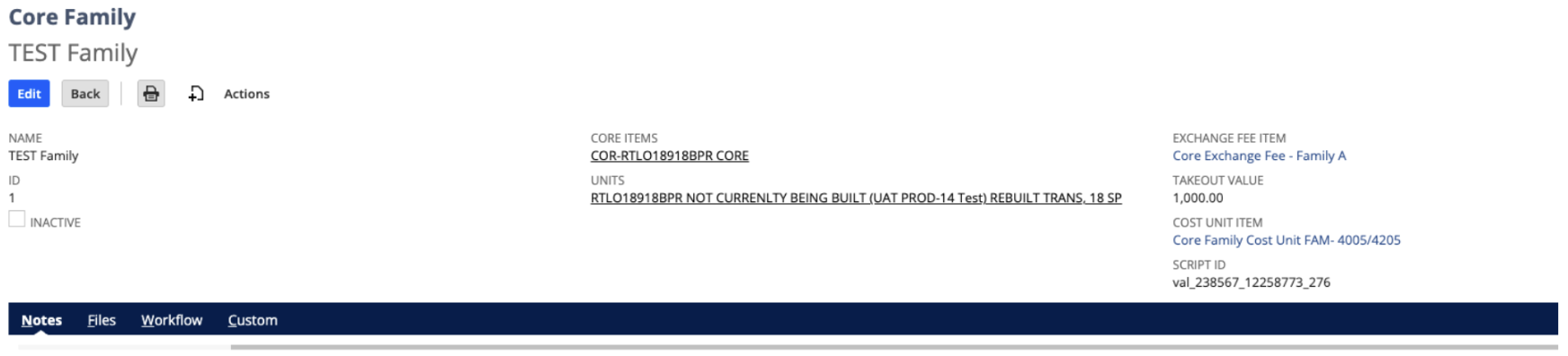
Once a Core Family exists for a part, everything downstream - the fee line on the sales order, the account it posts to, the record that tracks the obligation - runs on automation. Nobody has to remember to add a core fee manually or pick the right liability account by hand.
Step 2: The Transaction Walkthrough
Sales order
A user enters a standard sales order for the unit item. On save, the system looks up the linked Exchange Fee item from the Core Family record and adds it to the order automatically, tagged to a liability account rather than income. Nothing is earned yet - the fee is just sitting on the order as a placeholder obligation.
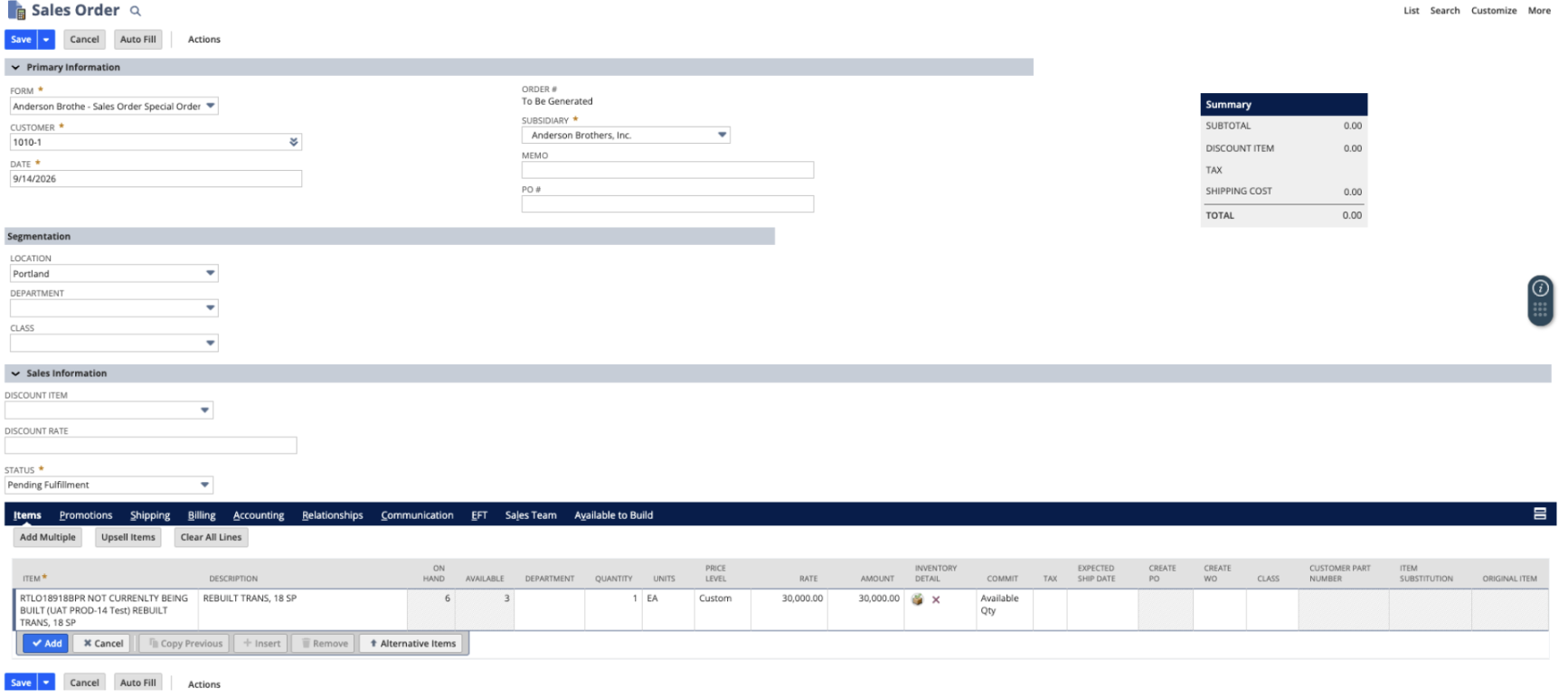
Sales order entry: unit item, quantity, and rate
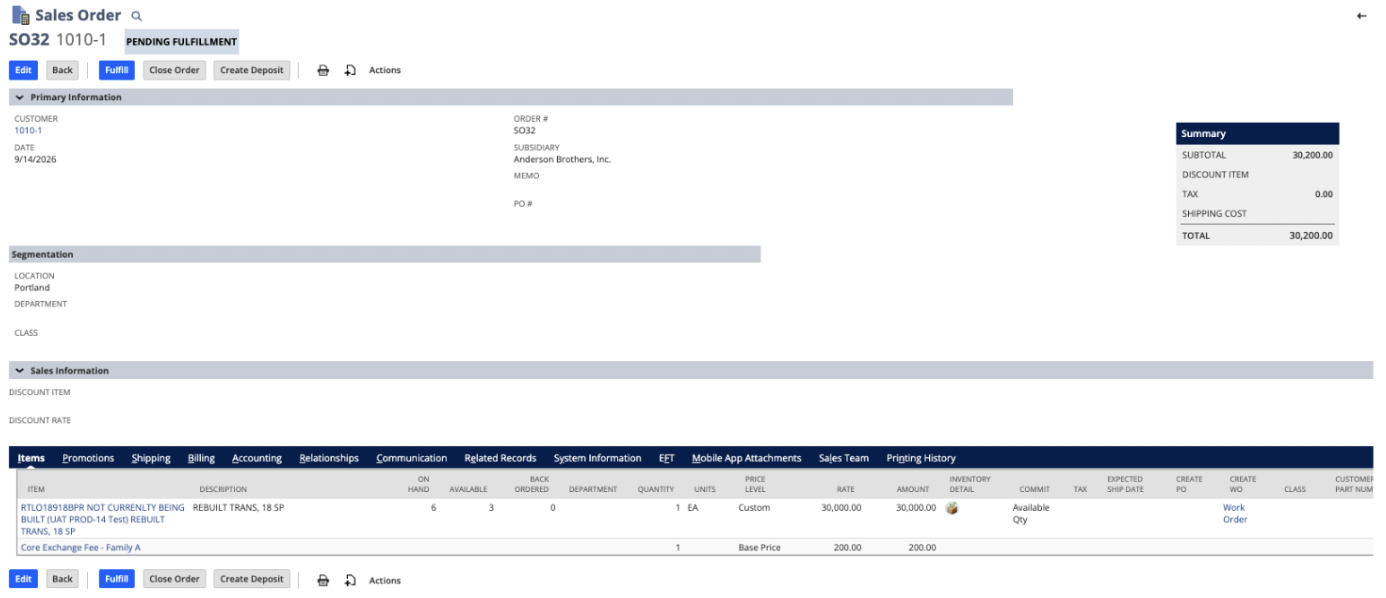
Saved order: the $200.00 Exchange Fee line was added automatically alongside the $30,000.00 unit
Fulfillment: GL Entry 1
Fulfillment is standard. The Exchange Fee line has no GL impact at this stage; only the unit's cost moves, debiting COGS and crediting inventory as it would on any normal fulfillment.
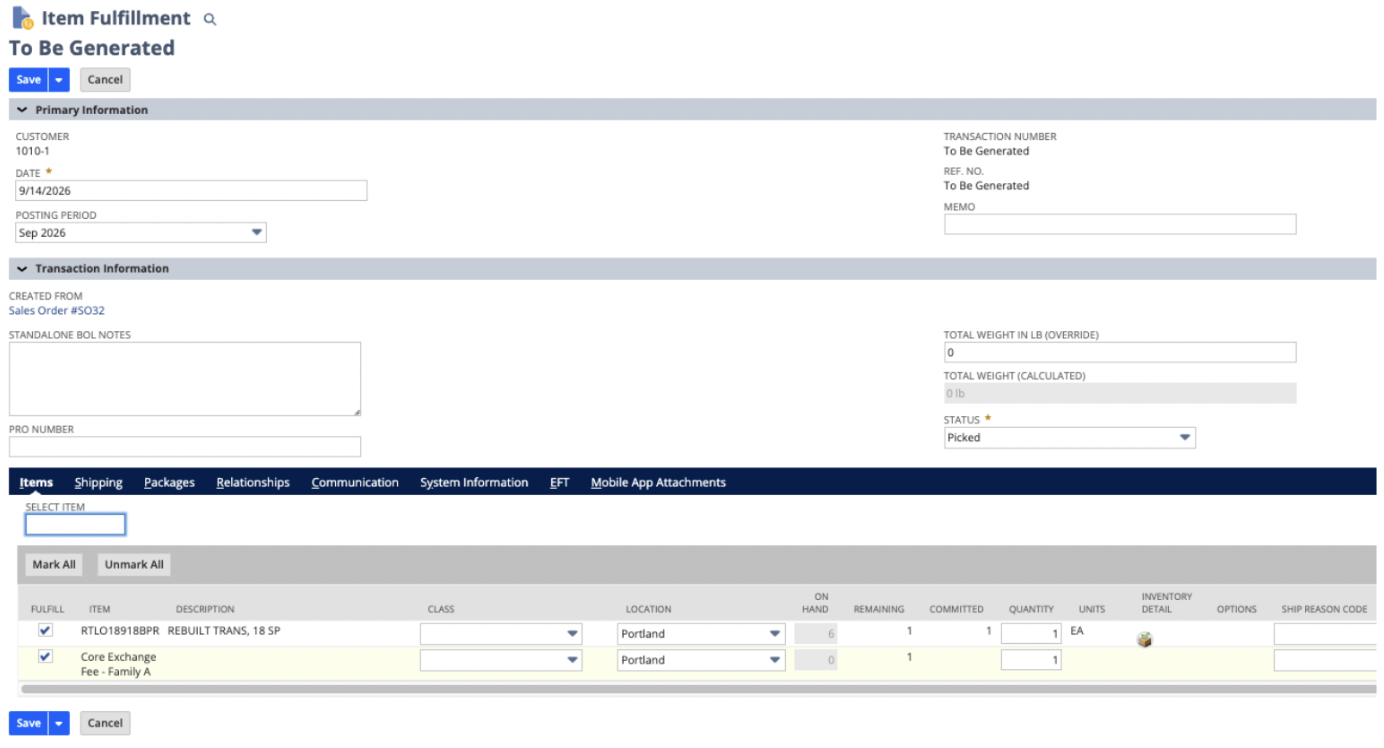
Item Fulfillment for the unit and the Exchange Fee line
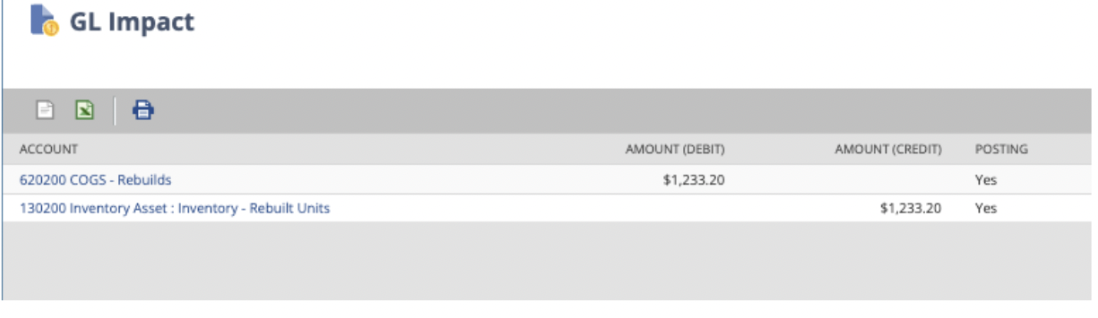
GL Impact: unit cost moves from inventory into COGS
Invoice: GL Entry 2
This is where the liability actually lands. Saving the invoice debits Accounts Receivable for the full order amount, credits revenue for the unit's rate, and - critically - credits the exchange fee to a liability account instead of revenue. In our worked example, a $30,000 unit with a $200 core fee posts as:
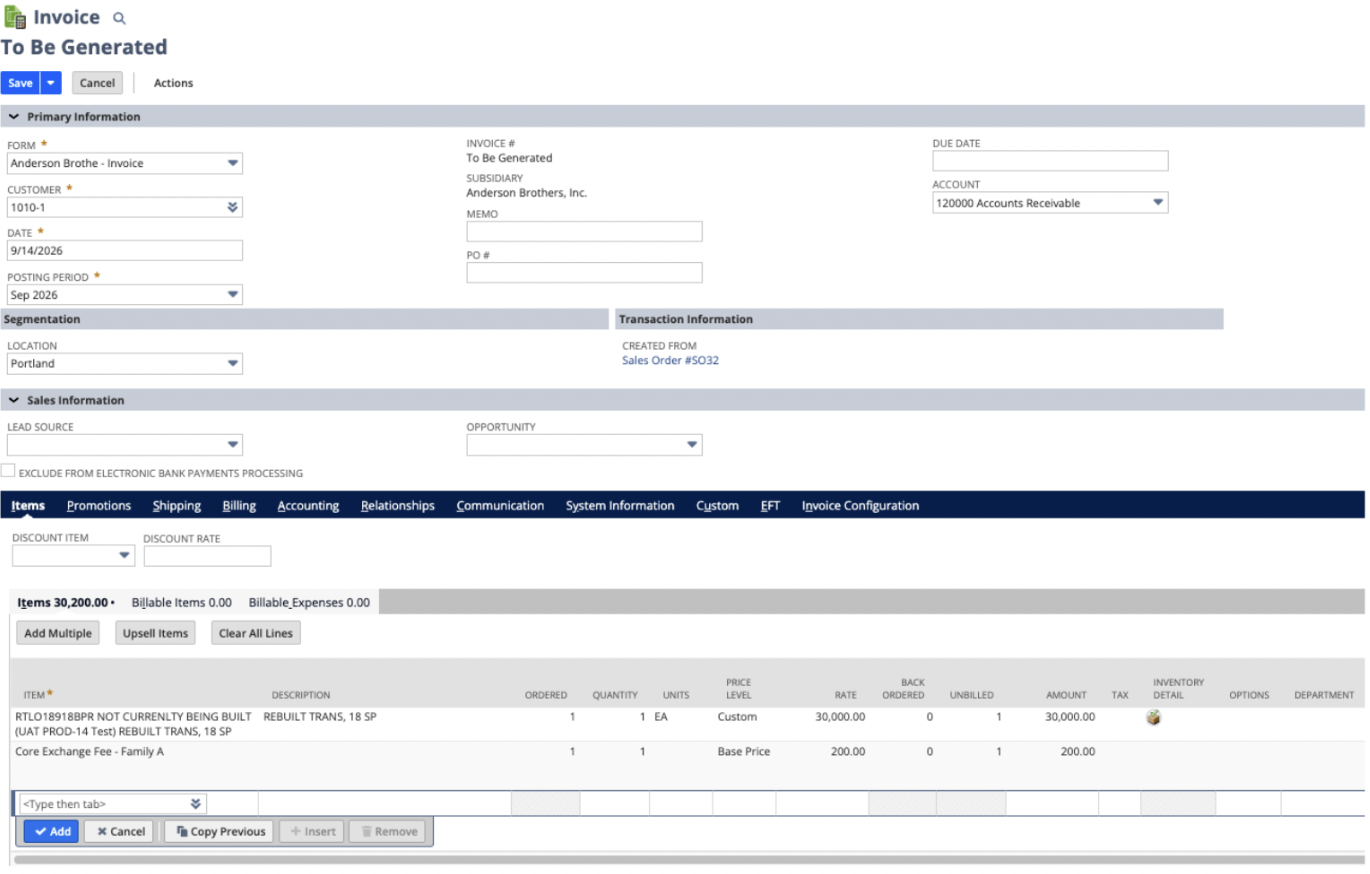
Invoice for the unit ($30,000.00) and the core exchange fee ($200.00)

GL Impact: AR debited $30,200.00; Revenue credited $30,000.00; Customer Core Charges (liability) credited $200.00
Core Bank Table & RMA
Saving the invoice also triggers two things automatically: a Core Bank Table record is created to track the obligation, and an RMA is generated for the core.
The Core Bank Table is the system of record for that obligation - it holds the outstanding liability, the outstanding core quantity, the invoice date, an expiration date defaulted to three months out, and a status field that moves through values like Open, Fully Returned - Pending Credit, Closed, or Expired - Unreturned. The RMA it generates is financial-only at this point; nothing physical has happened yet. Receiving the actual core later is a separate step.
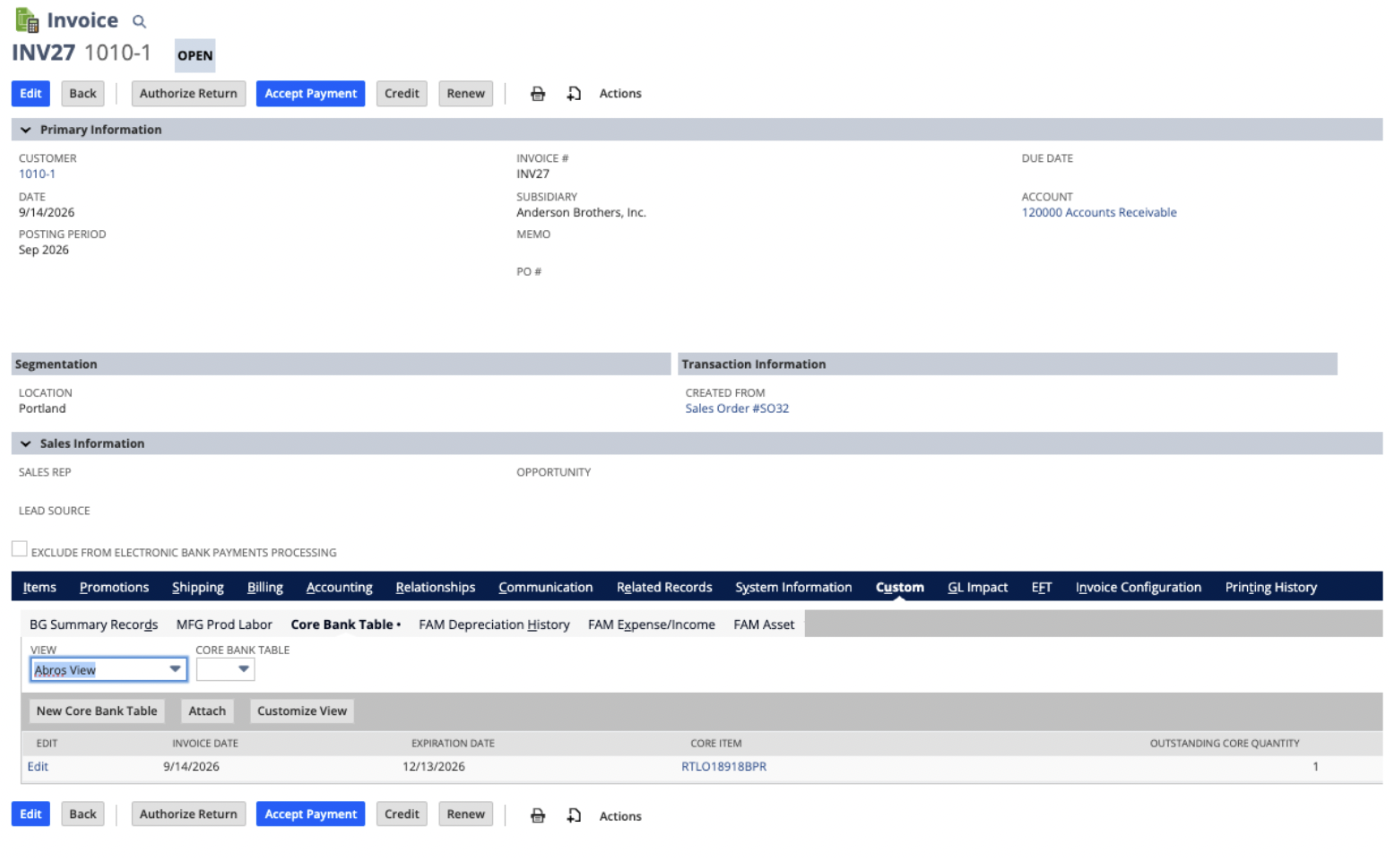
The invoice's Core Bank Table sub-tab, linking to the record just created
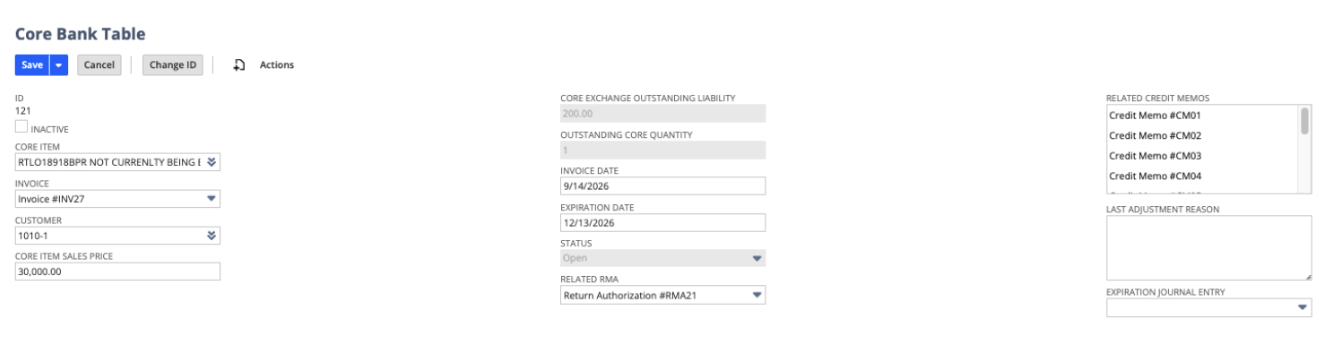
Core Bank Table: $200.00 outstanding liability, 1 core outstanding, linked to the RMA
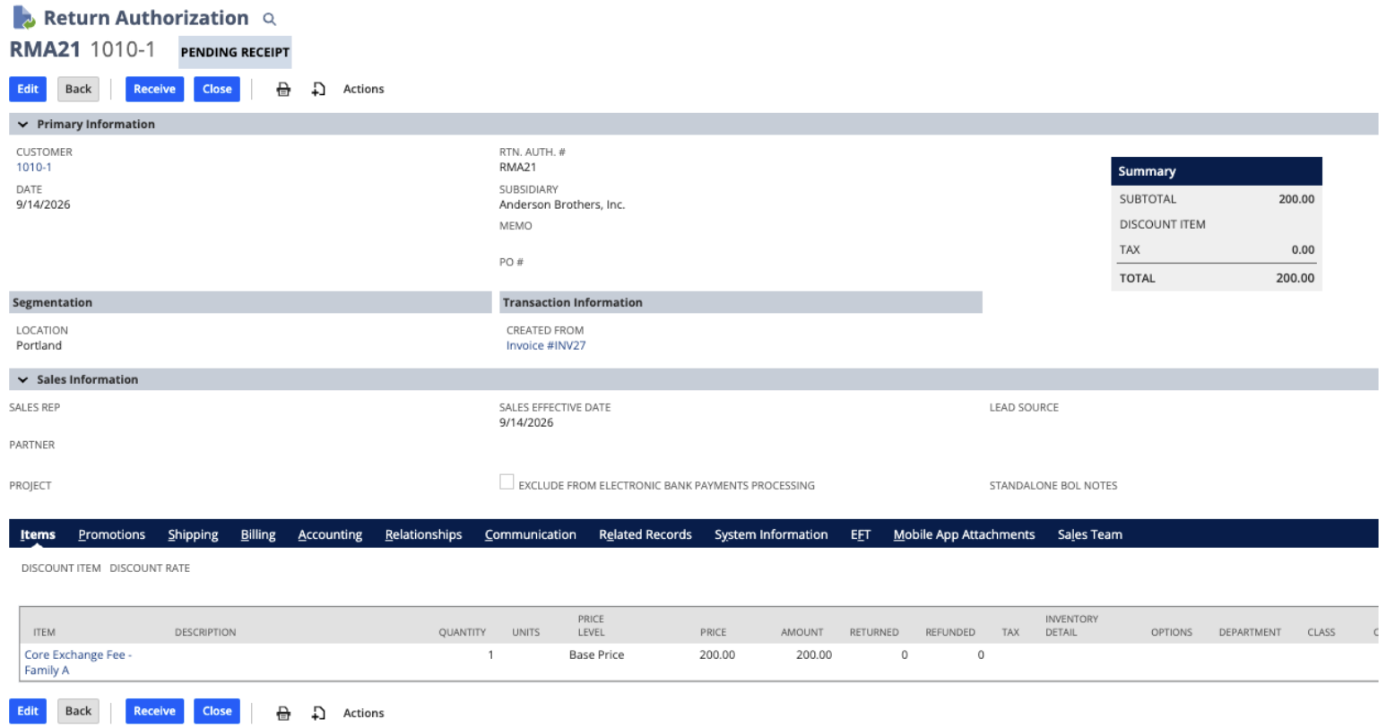
Return Authorization (RMA) auto-created for the $200.00 core exchange fee
Step 3: How the Obligation Closes Out
From here, every core exchange resolves one of two ways.
Path A: The Core Comes Back
Three transactions happen in sequence.
Item Receipt (financial). Receiving the core against the RMA has no GL impact, because the line being received, the Exchange Fee, is a non-inventory item. This step's only job is to zero out the Core Bank Table's outstanding quantity.
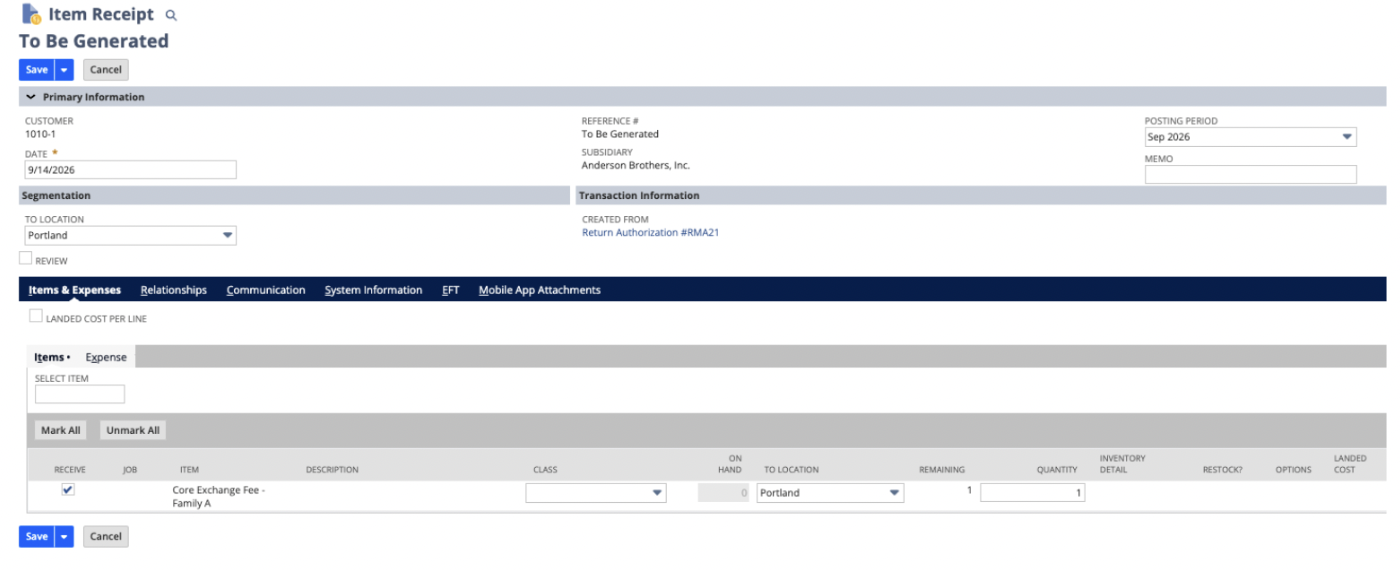
Item Receipt against the RMA for the returned core
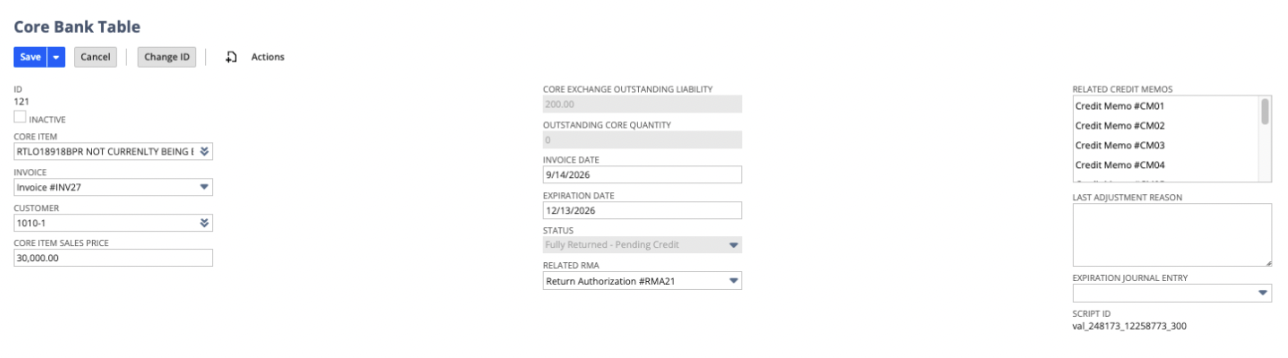
Core Bank Table after receipt: Outstanding Core Quantity is now 0
Physical Core Receipt. The financial receipt doesn't put the physical part into stock, so we built a separate Core Receipt & Valuation screen. It pulls in the Item Receipt and asks for the core's serial number, grade, and receiving location. Submitting it generates an inventory adjustment that brings the core into inventory at its estimated value - the first real GL posting on this path:
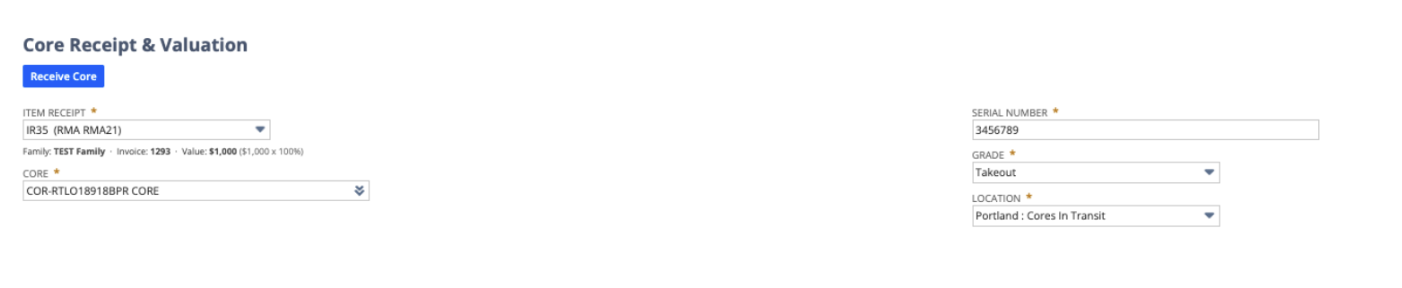
Core Receipt & Valuation: serial number, grade, and location captured for the returned core
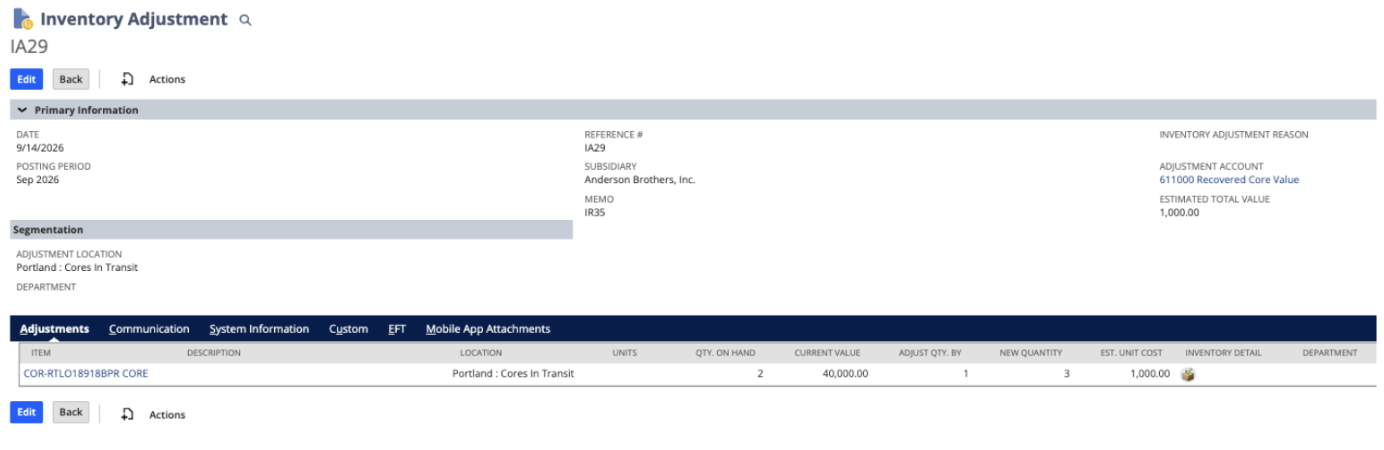
Resulting inventory adjustment, valuing the core at its $1,000.00 estimate
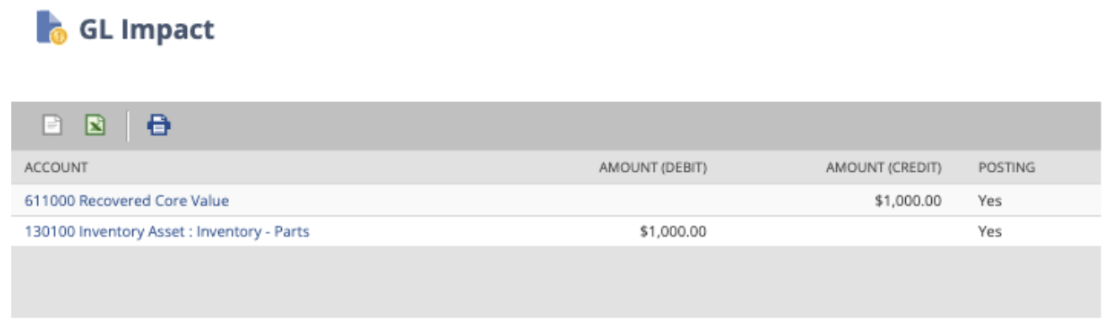
GL Impact: Inventory Asset debited, Recovered Core Value credited — $1,000.00
Credit Memo. A credit memo generated from the RMA clears the liability, debiting Customer Core Charges and crediting AR for the same amount:
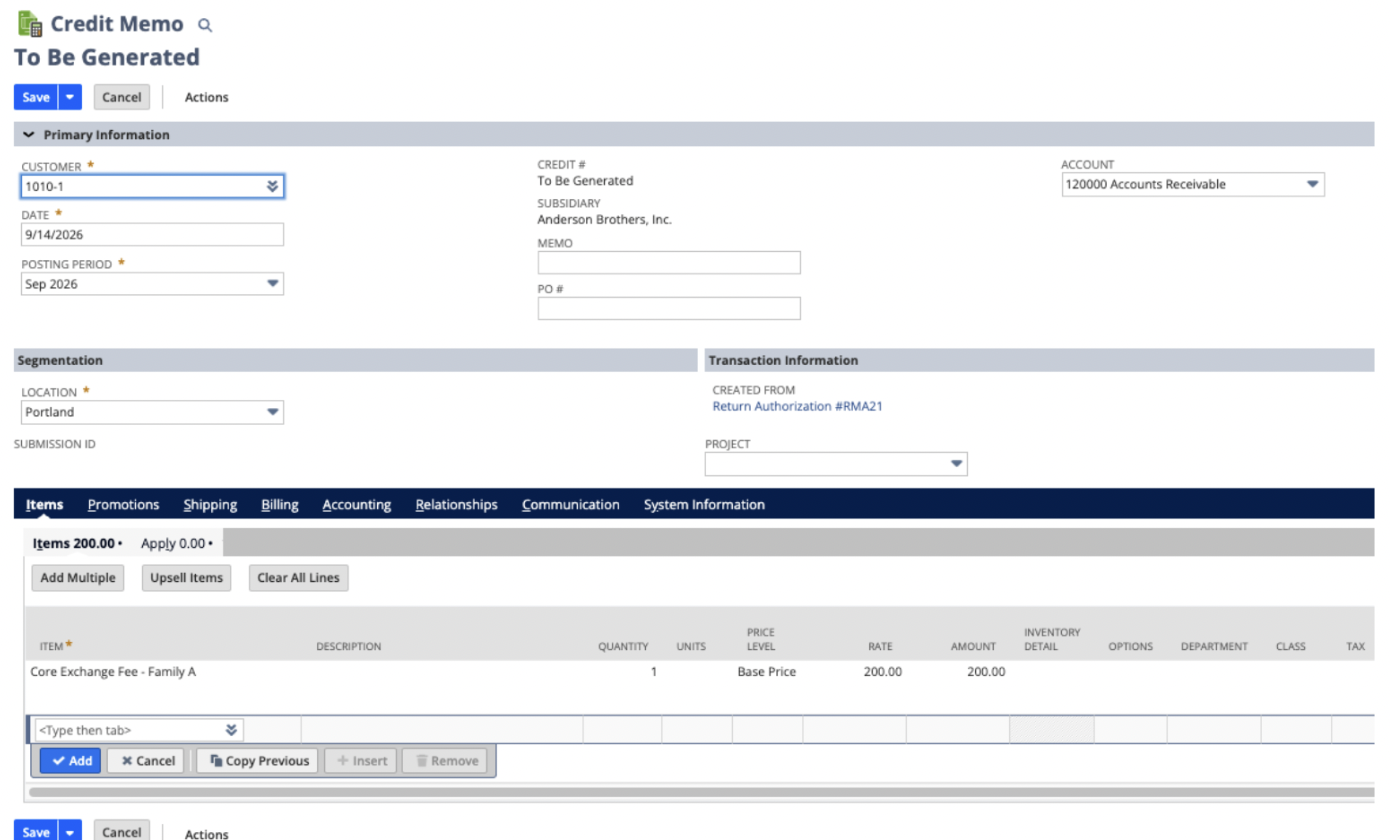
Credit memo for the $200.00 core exchange fee, created from the RMA

GL Impact of the credit memo: Customer Core Charges debited, AR credited — $200.00
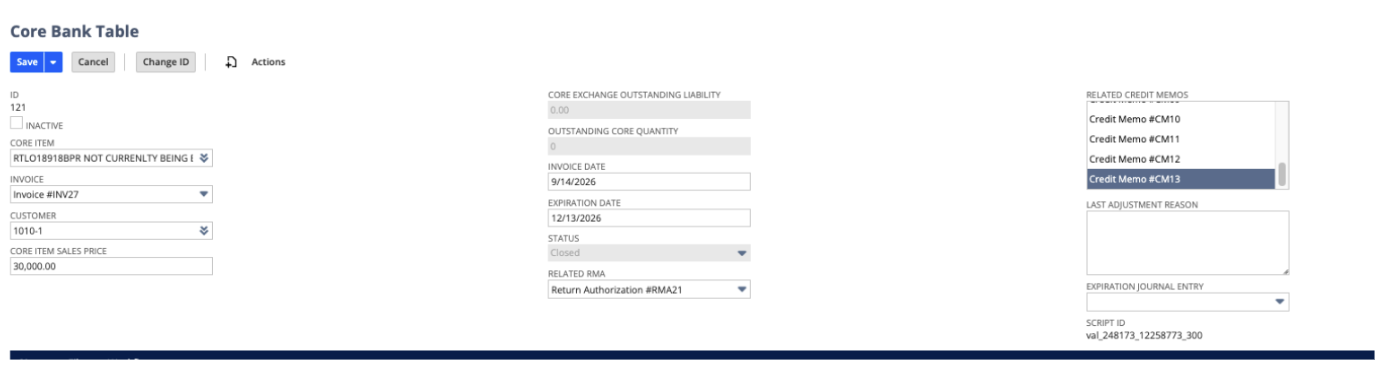
Core Bank Table closed out: $0.00 outstanding, status Closed, credit memo recorded
Path B: The Core Never Comes Back
If the expiration date passes with nothing returned, a script running once a day closes the obligation automatically. The liability and outstanding quantity zero out, and a journal entry converts the liability straight to revenue:
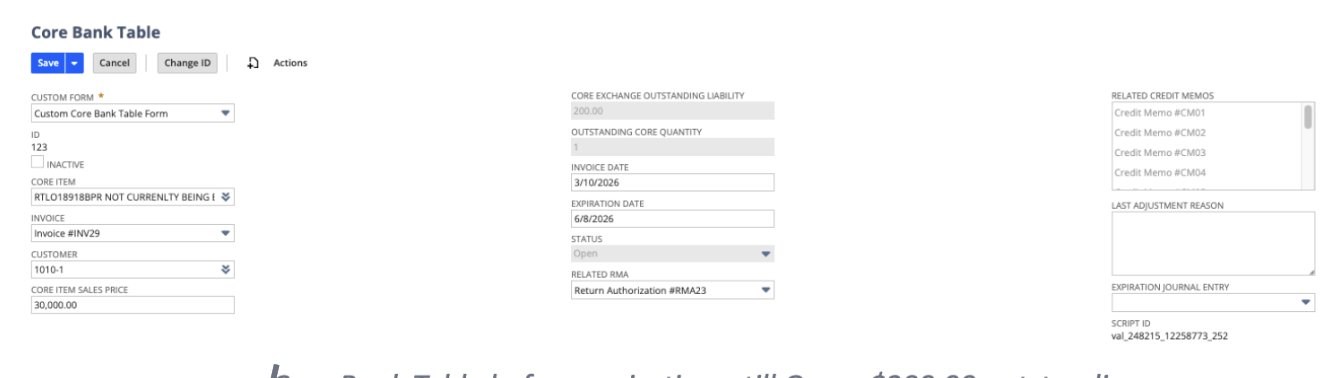
Core Bank Table before expiration: still Open, $200.00 outstanding
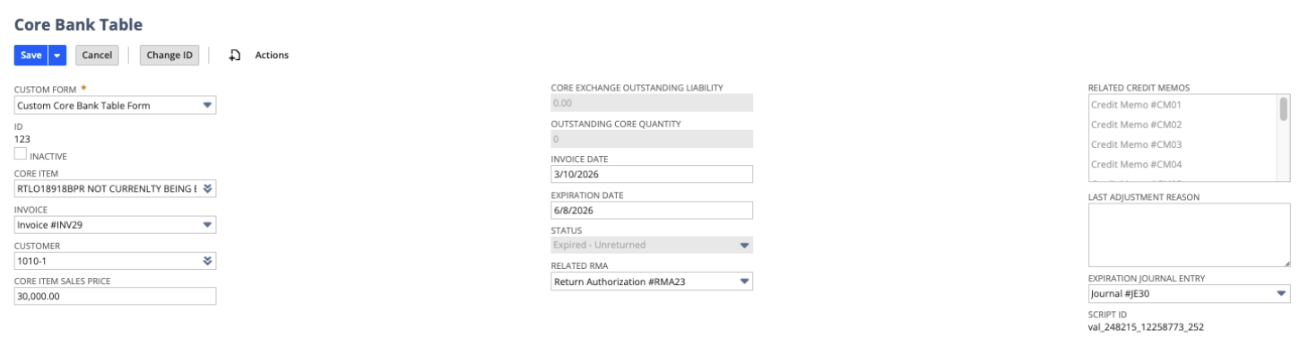
Core Bank Table after expiration: status Expired – Unreturned, liability zeroed, journal entry linked
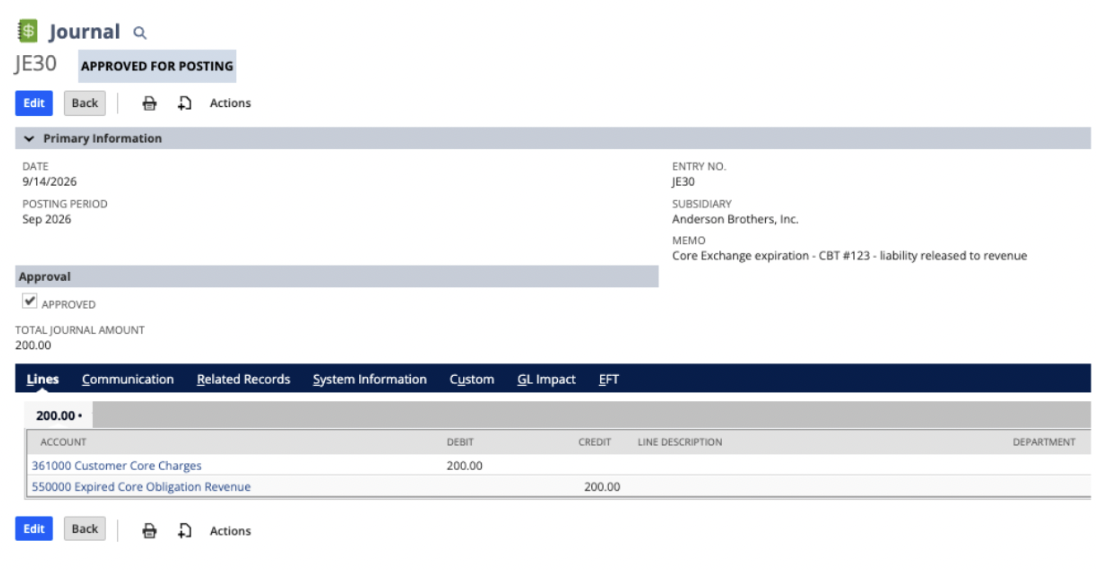
Journal entry: the $200.00 liability converted to revenue
The Core Bank Table lands on status Expired – Unreturned, with the journal entry linked back for audit purposes. No one has to run a report and manually sweep expired obligations — the system finds them and closes them on its own.
Step 4: General Ledger Flow Summary
Every exchange posts the same first two entries, then closes out along Path A (two entries) or Path B (one entry). (Worked example: $30,000.00 unit, $200.00 fee, $1,000.00 core valuation.)
1. Fulfillment
Account
Debit
Credit
620200 · COGS – Rebuilds
$1,233.20
130200 · Inventory Asset – Rebuilt Units
$1,233.20
2. Invoice
Account
Debit
Credit
120000 · Accounts Receivable
$30,200.00
530000 · Revenue – Transmissions
$30,000.00
361000 · Customer Core Charges (liability)
$200.00
3A. Close-out — core returned: physical receipt
Account
Debit
Credit
130100 · Inventory Asset – Parts
$1,000.00
611000 · Recovered Core Value
$1,000.00
Result: the physical core enters inventory at its estimated value. Does not affect the Customer Core Charges liability.
3B. Close-out — core returned: credit memo
Account
Debit
Credit
361000 · Customer Core Charges (liability)
$200.00
120000 · Accounts Receivable
$200.00
Result: liability $0.00, status Closed.
4. Close-out — core expired (scripted JE)
Account
Debit
Credit
361000 · Customer Core Charges (liability)
$200.00
550000 · Expired Core Obligation Revenue
$200.00
Result: liability $0.00, status Expired – Unreturned. Runs automatically, once daily, once the expiration date (3 months post-invoice) is reached.
The Net Effect
However an obligation resolves, the Customer Core Charges liability always nets to zero. The only real question the system is answering is where that $200 ends up - refunded back to the customer as recovered inventory value (Path A), or recognized outright as revenue (Path B). Worth noting: a returned core also brings $1,000 of physical inventory value onto the books that an expired core never does, so the two paths aren't just accounting mirror images of each other - one genuinely restocks the business, the other doesn't.
Why This Matters Beyond Rebuilders
This same pattern - a fee that's contingent on a future action, sitting in limbo as a liability until it resolves - shows up in far more places than core charges. This is a process we see across many different industries, and it reflects a common accounting process gap: charge now, obligate conditionally, resolve later. You'll find it in equipment and tool deposits, rental and loaner returns, cylinder and container deposits, subscription proration and mid-term plan changes, event and hospitality deposits, warranty core exchanges, even trade-in and buyback programs. Any business model where money changes hands before the underlying obligation is settled runs into this same accounting question. If any of that sounds familiar in your own NetSuite instance, the Core Family / Core Bank Table pattern is a solid starting point, whether or not parts are actually involved.
If you're running (or considering) a core exchange, deposit, or similar contingent-liability program on NetSuite, it's worth thinking through how this maps to your chart of accounts and item setup before you build it.
